ChatGPT
 Perplexity
 Claude

Stop wasting money on unnecessary Shopify apps. Learn exactly which apps to install, when to install them, and how successful Indian D2C brands build a scalable Shopify tech stack.
Summarize this post in AI's:
📌 TL;DR
Launching a Shopify store is easy. Building one that scales without turning into a tangled mess of apps, subscriptions, and monthly invoices? That’s the hard part.
Many founders install apps simply because someone recommended them in a Facebook group, a YouTube video, or a WhatsApp community. Six months later, they’re paying for tools they barely use, wondering why their store feels slower and why every new feature seems to break something else.
This guide takes a different approach. Instead of recommending every popular Shopify app, we’ll help you understand how to build the right tech stack for your business. You’ll learn which app categories actually matter, when you should invest in them, and how to avoid the common mistakes we see while working with Shopify brands.
Think of this as your roadmap. We’ll introduce each essential category, explain why it exists, share a few popular app options, and link you to our detailed comparison guides whenever you’re ready to dive deeper.
Building a Shopify Store Is Like Building a Cricket Team
Imagine you’re picking your IPL team. You wouldn’t choose eleven batsmen and hope for the best. You need bowlers. An all-rounder. A wicketkeeper. Someone who can finish the match under pressure.
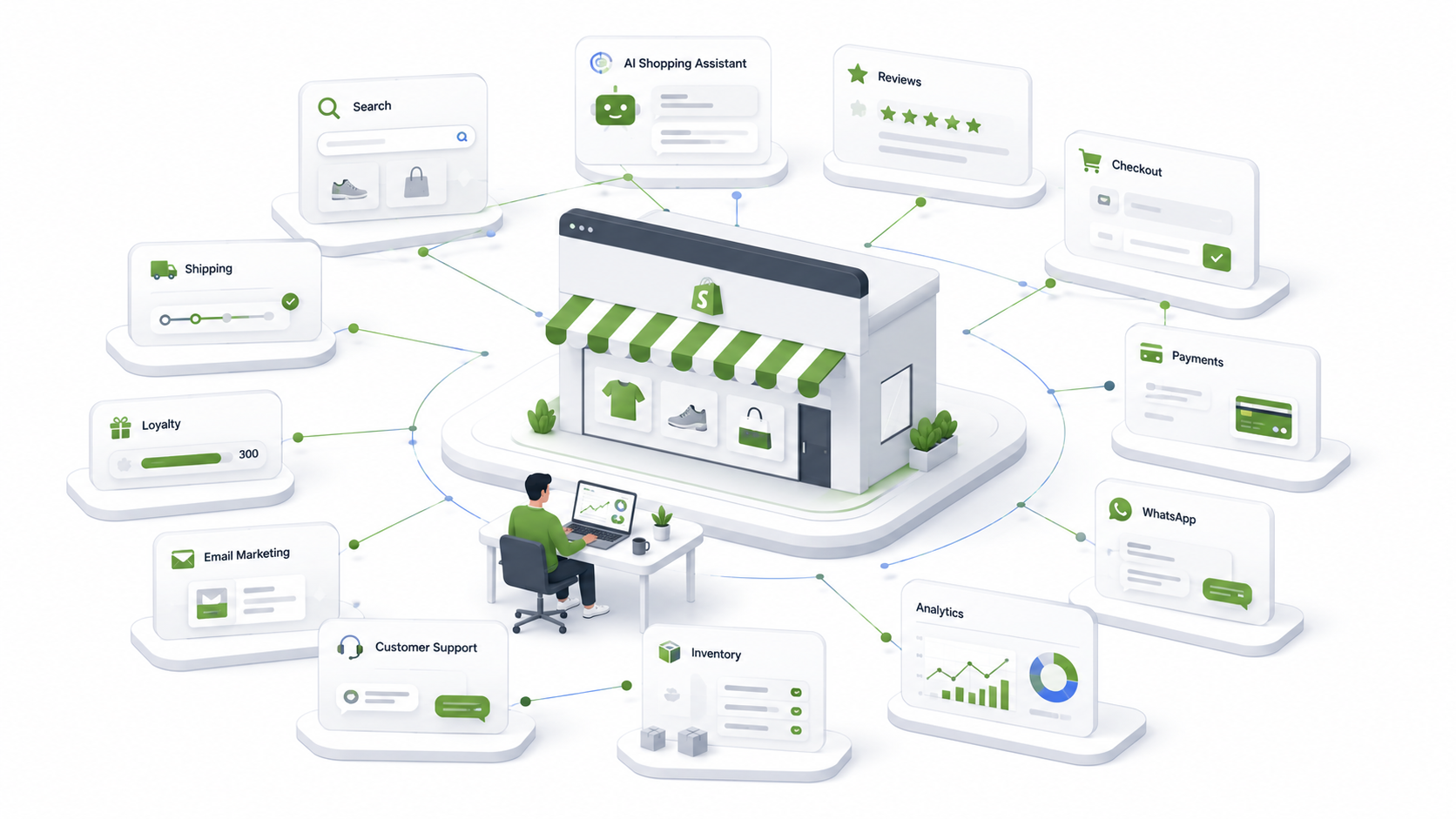
A Shopify store works exactly the same way. Your theme might look fantastic, but a beautiful website alone doesn’t help customers find products, trust your brand, track their orders, or come back for a second purchase. That’s where your tech stack comes in — think of it as the team working behind your storefront.
- Review apps build trust.
- Search apps help customers find products faster.
- Shipping apps make deliveries smoother.
- Loyalty apps encourage repeat purchases.
- Analytics tools tell you what’s actually working.
- AI shopping assistants answer questions even while you’re asleep.
Individually, they’re useful. Together, they create a shopping experience that feels seamless. The challenge is knowing which players deserve a place in your team—and which ones should stay on the bench.
Why Most Shopify Stores End Up With Too Many Apps
Here’s a story we’ve seen more times than we can count. A founder launches a new Shopify store, and the first week goes well. Then the recommendations start arriving:
- “You should install this review app.” — installed.
- “You also need a WhatsApp app.” — installed.
- “Don’t forget heatmaps.” — installed.
- “Try this popup.” — installed.
- “This AI chatbot is amazing.” — installed.
Three months later, the founder opens the Shopify Apps page and thinks:
“Wait… what does half of this stuff even do?”
If that sounds familiar, you’re not alone. Installing apps is incredibly easy. Removing them is much harder—especially once they’re connected to your checkout, customer accounts, email flows, or shipping operations. The result?
- Higher monthly software costs
- Slower storefront performance
- Conflicting app integrations
- A dashboard that’s harder to manage than your actual business
The irony is that most stores don’t have too few apps. They have too many of the wrong ones.
Founder Tip
Don’t ask “What’s the best Shopify app?” Ask “What’s the biggest problem or enhancement my store might today?”
The best app is the one that solves your next bottleneck, not someone else’s.

The 12 Building Blocks of a Modern Shopify Store
Instead of thinking in terms of apps, think in terms of capabilities. Every successful Shopify store is built using some combination of these twelve building blocks:
| Category | What It Helps You Do |
|---|---|
| Reviews & UGC | Build trust with customer feedback |
| Search & Discovery | Help shoppers find products quickly |
| AI Shopping Assistant | Answer questions and recommend products |
| WhatsApp & Customer Support | Engage customers instantly |
| Checkout & Payments | Reduce friction during checkout |
| Shipping & Order Tracking | Deliver orders efficiently |
| Loyalty & Rewards | Increase repeat purchases |
| Email & SMS Marketing | Recover carts and retain customers |
| Analytics & Heatmaps | Understand customer behaviour |
| SEO & Content | Grow organic traffic |
| Bundles & Upsells | Increase average order value |
| Operations & Automation | Save time on repetitive tasks |
In the following sections, we’ll explore each of these building blocks, explain why they matter, and highlight some popular app choices—without overwhelming you with endless feature comparisons.
What’s Next?
From here, the guide will walk through each category one by one:
- Why it matters
- When you actually need it
- A quick overview of popular apps
- Our practical recommendation
By the end, you’ll know not just which tools exist, but how to build a Shopify tech stack that grows with your business instead of slowing it down.
1. Reviews & User-Generated Content (UGC)
“Would you eat at a restaurant with zero reviews?”
Probably not. Now think about your customers. They’ve never heard of your brand before. They land on a product page, like what they see, and then… nothing. No reviews. No customer photos. No ratings. That’s usually enough to make them hesitate.
Reviews are one of the strongest trust signals in ecommerce. They reduce uncertainty, answer common questions through real customer experiences, and help shoppers feel more confident about clicking “Buy Now.” User-generated content (UGC), such as customer photos and videos, adds another layer of authenticity that polished product photography alone often can’t achieve.
Whether you’re just starting out or processing thousands of monthly orders, a review solution is one of the first investments worth making.
Popular Shopify Review Apps
| App | Best For | Starting Price |
|---|---|---|
| Judge.me | Most Shopify stores | Free |
| Loox | Photo & video reviews | Paid |
| Rivyo | Growing brands | Free + Paid |
| Stamped | Enterprise features | Paid |
Our Recommendation: Start simple. A lightweight review app like Judge.me is more than enough for most new and growing stores. As your brand begins collecting more visual content, you can explore platforms that offer advanced UGC features.
2. Search & Product Discovery
“Ever walked into a supermarket looking for toothpaste and somehow ended up in the pet food aisle?”
That’s exactly how customers feel when they can’t find what they’re looking for on an online store. As your product catalogue grows, search becomes more than a convenience—it becomes a conversion tool. A good search experience understands spelling mistakes, suggests relevant products, and helps customers discover items they didn’t even know they wanted.
If visitors are searching but leaving without buying, your search experience deserves attention.
Popular Shopify Search Apps
| App | Best For | Starting Price |
|---|---|---|
| Shopify Search & Discovery | Most stores | Free |
| Boost AI Search & Discovery | Large catalogues | Paid |
| Searchanise | Mid-sized stores | Paid |
| Doofinder | Advanced merchandising | Paid |
Our Recommendation: If you’re running a small to medium-sized store, Shopify Search & Discovery is an excellent starting point. Upgrade only when your catalogue or merchandising requirements become more advanced.
3. AI Shopping Assistants
“How many times have you answered, ‘Is this available in Medium?’ this week?”
Now imagine answering that question at 2:30 AM while you’re asleep. That’s what an AI Shopping Assistant does.
Unlike traditional chatbots that rely on fixed scripts, AI shopping assistants understand customer questions, recommend products, answer policy queries, and guide shoppers toward a purchase using your store’s information. They’re particularly valuable for brands with larger product catalogues or teams spending significant time handling repetitive customer questions.
Popular AI Shopping Assistants
| Solution | Best For |
|---|---|
| Retainley Shopbot | Personalized shopping assistance |
| Verifast AI | Sales conversations |
| LimeChat | Customer support |
| Gorgias AI Agent | Support automation |
Our Recommendation: Don’t implement AI because it’s trendy. Introduce it when your team starts spending too much time answering repetitive questions or when you want to improve product discovery without expanding your support team.
4. WhatsApp & Customer Support
“For Indian shoppers, WhatsApp isn’t just a messaging app—it’s practically customer support, order tracking, and shopping assistant all rolled into one.”
Many customers feel more comfortable sending a quick WhatsApp message than filling out a contact form or waiting for an email reply. Whether it’s asking about sizes, checking delivery timelines, or confirming payment options, instant communication builds confidence and often shortens the path to purchase.
The right WhatsApp solution can also automate order updates, recover abandoned carts, and reduce the workload on your support team.
Popular WhatsApp Apps
| App | Best For |
|---|---|
| Interakt | Customer communication |
| QuickReply | WhatsApp automation |
| Zoko | Commerce on WhatsApp |
| WATI | Team support |
| Business on bot | WhatsApp automation |
Our Recommendation: If a large percentage of your customers already message your business on WhatsApp, this category moves from “nice to have” to “essential.”
5. Checkout & Payments
“You’ve convinced the customer. They’ve found the perfect product. They’ve added it to their cart. They’re just one click away from buying… and then they disappear.”
That’s the ecommerce equivalent of getting ghosted. The checkout is where every marketing effort, product page, and ad campaign either pays off or falls apart. A slow, confusing, or untrustworthy checkout can undo everything you’ve worked so hard to achieve.
The good news? Shopify already provides one of the best checkout experiences in ecommerce. For most brands, the goal isn’t to replace it—it’s to enhance it. Think of checkout apps as finishing touches. They help you recover abandoned carts, enable faster payments, improve COD verification, offer one-click upsells, or streamline the overall buying experience.
Popular Shopify Checkout & Payment Apps
| App | Best For |
|---|---|
| Fasterr | Fast one-click checkout |
| GoKwik | COD optimization & checkout |
| Razorpay Magic Checkout | Faster Indian payments |
| Cashfree Payments | Multiple payment methods |
Our Recommendation: Don’t over-engineer your checkout on day one. Start with Shopify’s native checkout and only add specialized tools when your data shows a real need, such as high COD returns or checkout abandonment.
Common Mistake
Many brands install multiple checkout-related apps hoping to improve conversions. Instead, they end up creating conflicting experiences that slow the checkout or confuse customers. Keep it simple — every extra step should have a measurable business benefit.
6. Shipping & Order Tracking
“The order confirmation email is exciting. The waiting game that follows? Not so much.”
Customers don’t just buy products—they buy the promise that those products will arrive on time. The moment an order is placed, shipping becomes one of the biggest drivers of customer satisfaction. Delays, poor tracking, and unclear delivery updates can quickly turn a happy customer into a frustrated one.
A good shipping solution helps you automate label generation, compare courier partners, track shipments, manage returns, and proactively notify customers about delivery updates.
Popular Shopify Shipping Apps
| App | Best For |
|---|---|
| Shiprocket | Multi-carrier shipping |
| Delhivery | Logistics network |
| Pickrr | Courier aggregation |
| NimbusPost | Growing D2C brands |
Our Recommendation: If you’re shipping across India, choose a platform that gives you access to multiple courier partners. This gives you better delivery coverage and more flexibility as your order volume grows.
Common Mistake
Founders often spend weeks negotiating shipping rates while ignoring delivery communication. Customers are usually more forgiving of a one-day delay than they are of not knowing where their order is. Invest in a great tracking experience as much as competitive shipping rates.
7. Loyalty & Rewards
“Getting a customer to buy once is great. Getting them to come back without another expensive ad? That’s where the real magic happens.”
Acquiring a new customer is often much more expensive than retaining an existing one. That’s why successful D2C brands invest in loyalty programs once they have a steady flow of repeat customers. Loyalty apps reward customers for purchases, referrals, birthdays, reviews, and other meaningful interactions. Done well, they increase customer lifetime value while making repeat purchases feel rewarding rather than transactional.
Popular Shopify Loyalty Apps
| App | Best For |
|---|---|
| Retin | Loyalty & referrals |
| Nector | Indian D2C brands |
| Retainley | Free + Best Support |
| BON Loyalty | Growing stores |
Our Recommendation: Don’t launch a loyalty program on your first day. Focus on acquiring customers first. Once repeat purchases become a meaningful part of your business, loyalty programs can significantly improve retention.
Common Mistake
Launching a loyalty program before you have loyal customers. Points don’t create loyalty — great products and customer experience do. A loyalty program simply gives customers one more reason to come back.
8. Email & Customer Retention
“Not every customer buys on their first visit. In fact, most don’t.”
Some are comparing prices, some are waiting for payday, and some simply get distracted by a phone call, a Slack notification, or a cat video. That doesn’t mean they’re lost forever.
Email and SMS marketing help you reconnect with shoppers through abandoned cart reminders, welcome journeys, post-purchase communication, and personalized product recommendations. It’s one of the most cost-effective ways to turn first-time visitors into repeat customers.
Popular Email Marketing Apps
| App | Best For |
|---|---|
| Klaviyo | Advanced automation |
| Omnisend | Email + SMS |
| Shopify Email | Simple campaigns |
| Mailchimp | General marketing |
Our Recommendation: Start with simple automated flows like Welcome Emails, Abandoned Cart Recovery, and Post-Purchase Follow-ups. These often deliver the biggest returns with the least effort.
Common Mistake
Sending promotional emails every other day. Nobody enjoys opening their inbox to find fifteen “Last Chance!” emails from the same brand. Focus on sending fewer, more relevant messages that customers actually want to read.
9. Analytics & Customer Insights
“Imagine playing a cricket match without knowing the score.”
Sounds impossible, right? Yet that’s exactly how many Shopify stores operate. They spend thousands on ads, launch new products, redesign pages, and run discounts… without knowing what’s actually working.
Analytics isn’t just about counting visitors. It’s about understanding why customers buy, where they drop off, and which marketing efforts are actually making you money. A good analytics stack helps you answer questions like:
- Which products get the most attention?
- Where are customers leaving the website?
- Which marketing channels generate actual revenue?
- Which pages need improvement?
- How can you increase conversion rate?
The answers to these questions often have a much bigger impact than installing another app.
Popular Shopify Analytics Apps
| App | Best For |
|---|---|
| Microsoft Clarity | Heatmaps & session recordings |
| Google Analytics 4 | Website analytics |
| Triple Whale | Marketing attribution |
| Polar Analytics | Ecommerce dashboards |
Our Recommendation: Every Shopify store should have at least one analytics tool beyond the default dashboard. Microsoft Clarity is free and incredibly useful for understanding how real visitors interact with your store.
Common Mistake
Checking revenue every morning — and nothing else. Revenue is the result. Great brands also monitor conversion rate, average order value, cart abandonment, repeat purchase rate, and customer lifetime value. Those numbers tell you why revenue is going up—or down.
10. SEO & Content Marketing
“The best customer is the one you don’t have to pay for every single time.”
Paid ads are fantastic — until you pause them. SEO works differently. A well-optimized Shopify store continues attracting customers from Google long after you’ve published the content. That’s why SEO isn’t just another marketing channel—it’s a long-term business asset.
Good SEO goes far beyond adding keywords to product pages. It includes technical optimization, fast loading speeds, structured collections, internal linking, helpful blogs, image optimization, and answering the exact questions your customers are searching for. If your goal is sustainable growth, SEO deserves a place in your tech stack from the beginning.
Popular Shopify SEO Apps
| App | Best For |
|---|---|
| TinyIMG | Image optimization |
| Plug In SEO | Technical SEO |
| Sherpas Smart SEO | Meta tags & structured data |
| Yoast SEO | On-page optimization |
Our Recommendation: Apps can help with technical SEO, but they can’t replace great content. Invest in both. Helpful content is what earns long-term trust and organic traffic.
Common Mistake
Publishing ten blogs titled “Top 10 Products You Should Buy” and wondering why they don’t rank. Google rewards content that genuinely helps users solve problems, not articles written only to target keywords.
11. Bundles, Upsells & Cross-Sells
“Would you like fries with that?”
Congratulations — you’ve just experienced one of the oldest upselling strategies in history. The same principle works online. Instead of convincing more people to buy, you encourage existing customers to spend a little more. Bundles, upsells, and cross-sells increase your Average Order Value (AOV) without increasing your advertising budget.
Examples include:
- “Frequently Bought Together”
- Buy 2, Get 1 Free
- Complete the Look
- Add Matching Accessories
- Upgrade to a Premium Version
When used thoughtfully, these suggestions feel genuinely helpful rather than pushy.
Popular Shopify Bundle Apps
| App | Best For |
|---|---|
| Bundler | Product bundles |
| Fast Bundle | Mix & match offers |
| Selleasy | Upsells & cross-sells |
| Rebolt | Volume discounts |
Our Recommendation: Start with one simple upsell strategy. Measure the impact before adding more offers. Too many promotions can overwhelm shoppers and reduce conversions.
Common Mistake
Showing five popups before the customer even reaches checkout. Upselling should feel like good advice from a helpful salesperson—not pressure from someone trying to hit their monthly target.
12. Operations & Automation
“Running an ecommerce business shouldn’t mean copying and pasting the same information fifty times a day.”
As your business grows, repetitive tasks start eating into your team’s time — updating inventory, tagging orders, sending internal notifications, syncing products, managing workflows. These tasks may seem small individually, but together they can consume hours every week. Automation tools help you eliminate repetitive work so your team can focus on activities that actually grow the business.
Popular Shopify Operations Apps
| App | Best For |
|---|---|
| Shopify Flow | Workflow automation (Shopify plans that support it) |
| Matrixify | Bulk imports & exports |
| Mechanic | Advanced automation |
| Zapier | Connecting Shopify with other tools |
Our Recommendation: Don’t automate everything. Automate the repetitive tasks that are slowing your team down the most. Good automation saves time without making your business harder to understand or maintain.
Common Mistake
Automating a broken process. If your workflow is confusing today, automation will simply help you make the same mistakes… faster. Fix the process first, then automate it.
Frequently Asked Questions
A Shopify tech stack is the collection of apps, tools, and integrations that power your online store. It includes reviews, search, shipping, analytics, marketing, AI, loyalty, and customer support.
Conclusion
Your Shopify tech stack isn’t something you build once and forget. It evolves as your business grows. The tools that help you launch your first store won’t necessarily be the same tools that help you scale to thousands of orders every month—and that’s perfectly okay.
The goal isn’t to have the biggest collection of apps. It’s to have the right collection of apps. Start with the essentials, measure what matters, add new tools only when they solve a real problem, and don’t be afraid to simplify as your business evolves.
Remember, the best Shopify stores aren’t powered by the most software. They’re powered by thoughtful decisions.
Need Help Choosing the Right Shopify Apps?
Every Shopify brand is different. A fashion label, a skincare company, a furniture brand, and a B2B wholesaler all have different requirements, customer journeys, and operational challenges. That’s why there isn’t a single “perfect” Shopify tech stack.
At FarziEngineer, we help D2C brands design, build, and optimize Shopify stores that are fast, scalable, and tailored to the way they actually do business. Whether you’re launching a new store, migrating from another platform, or trying to simplify an overcomplicated setup, we’ll help you choose technology that supports your growth instead of getting in the way.
Book a Free Shopify Tech Stack Consultation — let’s build a Shopify store that’s ready for your next stage of growth.